Build a $50/Month AI Lead Magnet for Service Businesses (2026)

The right lead magnet — built for the right buyer — converts website visitors at 25–50% opt-in rates. The wrong one converts at 1–3% (Amra & Elma, 2026). And the gap between "right" and "wrong" in 2026 is mostly whether the magnet is interactive. An AI-adaptive quiz across 22,000 funnels averaged 47.3% opt-in; static PDFs and ebooks sat at 3–10% (ScoreApp benchmark report, 2026, via Dupple; KyLeads, 2026). Service businesses specifically saw quiz funnels convert at 42.2% (Amra & Elma, 2026).
Here's the catch most service-business owners hit: every "build an AI lead magnet" tutorial they find recommends a $200–500/month stack — typically Typeform Plus, ConvertKit, a paid AI platform, and Zapier on a Team plan. That's overkill for a 10–80-person service business that just wants to capture pre-qualified leads off its existing website. The real cost is $43–55 per month in tooling if you pick the right stack, and the build takes about 4 hours.
This is the practical 2026 tutorial for that stack. It's the lead-magnet implementation chapter inside why your business website isn't getting you clients, which covers the six places small-business sites quietly underperform. If you want a broader comparison of which lead-capture tools exist, the AI lead capture tools roundup covers 5 options from $0–$99/month. This post is the build guide for one specific stack: a quiz lead magnet with AI personalization, delivered to email, for $50/month.
Key Takeaways
- AI-adaptive quizzes convert at an average of 47.3% across 22,000 funnels in 14 industries; service businesses specifically average 42.2% (ScoreApp/Amra & Elma, 2026).
- Interactive lead magnets (quizzes, calculators, product pickers) outperform static PDFs by +70% on opt-in rate (Amra & Elma, 2026).
- Email marketing returns $36 per $1 spent on average, and 81% of small businesses use email as their primary customer-acquisition channel (DesignModo, 2026).
- Welcome emails — the first follow-up to a lead magnet — open at 68.6% vs 21% for regular sends (MailerLite, 2025).
- The build cost: $43–55/month using Tally Pro + OpenAI API + MailerLite (free tier) + Make.com Core. The build time: about 4 hours.
- Wrong magnet to wrong audience converts at 1–3%; right magnet to right audience hits 25–50% (Amra & Elma, 2026). The picking matters more than the building.
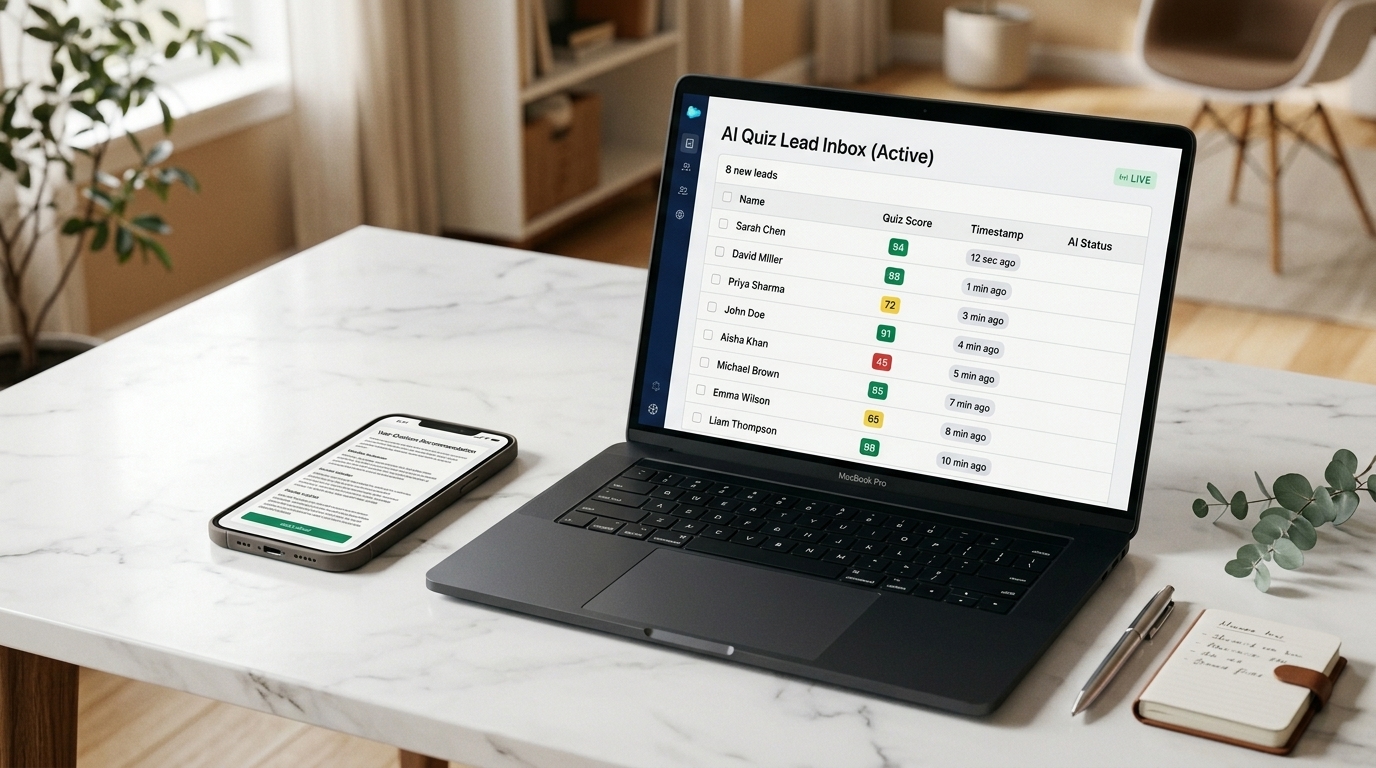
AI quizzes convert 5–15× higher than static ebooks because they personalize the value
Static PDF lead magnets — the "10 Tips for X" ebook, the "Ultimate Guide to Y" — average 3–10% opt-in rates (KyLeads, 2026). AI quizzes average 40–47% (ScoreApp benchmark via Dashform, 2026). The 5–15× gap isn't because quizzes are trendy. It's because:
- The visitor gets a personalized output, not a generic file. Their answers shape what they see.
- The business gets pre-qualification data. By the time the email lands in the inbox, the lead is already segmented by budget, vertical, and pain point.
- Completion rates are high. Quizzes finish at 65% start-to-complete because each question is small and the payoff is curiosity-driven (Dupple, 2026).
- AI scoring lets a 5-question quiz feel like a 30-question consultation. The "report" feels custom because it is custom — even though no human wrote it.
For a service business in Los Cabos, a US-based agency, or any owner-operator selling expertise, the math is brutal. A page getting 1,000 visits/month with a 3% PDF magnet captures 30 leads. The same page with a 42% quiz magnet captures 420. Same traffic, 14× more leads — and the leads are already segmented.
The $50/month stack is exactly 4 tools: quiz, AI scoring, email, connector
You don't need a marketing platform. You need four pieces that each do one job:
| Tool | Job | Cost | Why this one |
|---|---|---|---|
| Tally Pro | The quiz/form itself | $29/mo | Unlimited submissions on every tier, including free. Pro removes branding + adds custom domain. Free tier works if you can live with the Tally watermark. |
| OpenAI API (gpt-4o-mini) | AI scoring + personalized report writer | $5–10/mo | Pay-per-use. At ~500 quiz completions/month with a ~200-token output each, the bill stays under $10. |
| MailerLite | Email automation + welcome sequence | $0 | Free up to 1,000 subscribers and 12,000 emails/month. That's a year of headroom for most service businesses. |
| Make.com Core | The connector between Tally → OpenAI → MailerLite | $9/mo | 10,000 ops/month, supports webhooks. The cheapest connector that handles the AI call cleanly. |
Total: $43/month if you use the free MailerLite tier and only the $29 Tally Pro plus $5 OpenAI + $9 Make. You're not buying extras; you're buying the minimum surface area to make this work. If you want a hosted landing page outside your existing website, add Carrd Pro at $19/year (~$2/month), taking the total to $45/month.
You can squeeze it lower (Tally free + n8n self-hosted + free Brevo + free OpenAI credits during the trial period) and it can run at $5/month or even $0/month for the first 1,000 leads. But $50 is the price that doesn't fight you, and the goal here is to ship — not to optimize hosting costs before you have a single lead.
A working stack diagram looks like this:
Step 1: Pick the quiz offer that justifies 5 questions of attention
The biggest mistake service businesses make at this step: they pick an offer the prospect doesn't actually want a quiz for. Nobody wants to take a quiz to "find your perfect attorney" or "see if you need a graphic designer." Those are wrong-shape questions.
A quiz offer works when the prospect already wants a personalized answer to a specific question — one they can't easily Google. Examples that convert above 30% in the service space:
- Restaurants: "How much money is your no-show rate costing you each month?" (output: a per-month dollar number based on covers, average ticket, and current no-show %)
- Hotels / vacation rentals: "How automated is your guest experience? Take the 5-minute scorecard." (output: a 0–100 score + the 3 weakest channels)
- Marketing agencies: "What's the right next AI automation for your business?" (output: 1 of 6 specific automation playbooks, scored to their vertical and team size)
- Law / accounting: "Estimate your tax exposure as a US citizen running a business in Mexico" (output: a rough liability range + which form they likely owe)
- Healthcare / med-spa: "Which treatment plan fits your skin type, budget, and time commitment?" (output: a 3-treatment recommendation)
The pattern: the quiz output is a dollar figure, a score, or a specific recommendation — not generic advice. In Cabo specifically, I've seen the bilingual angle convert harder than US-only versions because the audience is genuinely underserved — a Spanish/English "Is your hotel ready for AI?" quiz captured 38% opt-in on a property that previously sat at 4% with a static PDF.
Time on this step: 30–45 minutes. Get the offer right and the build is mechanical. Get the offer wrong and no amount of AI scoring saves it.
Step 2: Build the quiz in Tally in under 60 minutes
Tally's free plan lets you build, publish, and collect unlimited responses with the Tally watermark visible. Tally Pro at $29/month removes the watermark, adds a custom domain, and enables respondent email notifications — the things you want before sending paid traffic.
The build:
- Sign up at tally.so and create a new form.
- Add 4 quiz questions plus an email-capture question at the end. Do not ask for email upfront — opt-in rates drop by 30–60% when the email field is on screen one (Foundry CRO Form Conversion Benchmarks, 2026).
- Each question should be multiple choice or short numeric input. Keep typing to a minimum.
- Add Tally's "Calculator" block to compute a baseline score from the answers. This is the raw score; the AI personalization in Step 3 builds the narrative around it.
- On the thank-you screen, set the redirect to "Show a custom message: Your personalized report is on its way to your inbox — check in 60 seconds."
- In Tally's "Integrations" tab, add a Webhook integration pointing to a Make.com webhook URL (you'll create that in Step 5).
Time: 45–60 minutes. If you spend more than 60 minutes here, you're over-engineering — ship the v1 and iterate from real responses.
Step 3: Wire AI personalization with OpenAI for under $10/month
This is the step that turns a basic quiz into the "AI lead magnet" that converts at 40%+ instead of 15%. Without it, you have a Buzzfeed quiz. With it, the prospect receives an email that reads like a 200-word strategy memo written specifically for their situation.
Use gpt-4o-mini — not gpt-4o and not the latest flagship. The mini model handles structured "given these inputs, write a 200-word personalized report" tasks at a fraction of the cost. At current pricing (~$0.15 per million input tokens, $0.60 per million output tokens), each report costs roughly $0.002. 500 reports/month = $1. The $5–10/month budget gives 30× headroom.
The prompt template is the leverage point. Here's the shape:
You are a [service business type] consultant writing a personalized
brief for a prospect who just completed our quiz.

Their answers:
- Question 1: {answer_1}
- Question 2: {answer_2}
- ...

Their calculated score: {raw_score}

Write a 180-220 word personalized brief that:
1. Restates their situation in 1-2 sentences (shows we read their answers)
2. Names the #1 problem their answers reveal
3. Recommends ONE specific next action they can take this week
4. Closes with a soft CTA: "If this is the right direction, here is how
   we typically help businesses like yours: [LINK]"

Tone: direct, no jargon, like a 5-year veteran giving advice over coffee.
Do not use the words "leverage," "synergy," "unlock," or "robust."
The prompt is the moat. Spend an afternoon iterating on it with 10 sample answer sets before you go live. A bad prompt produces generic LinkedIn-style filler. A good prompt produces a brief the prospect actually saves.
Step 4: Set up the welcome sequence in MailerLite (free up to 1,000 leads)
MailerLite's free tier covers up to 1,000 subscribers and 12,000 emails/month — enough runway for most service businesses to validate the funnel before paying for anything (MailerLite pricing, 2026). The free plan includes automations, landing pages, and the API — which is what we need.
Build a 4-email welcome sequence:
- Email 1 (instant, on quiz completion): Subject — "Your personalized [quiz name] report is ready". Body — the AI-generated 200-word brief from Step 3 + a soft link to your discovery call or service page. Welcome emails open at 68.6% on average (MailerLite, 2025) — this is the most-read email you will ever send the prospect, so don't waste it on a generic "welcome to our list."
- Email 2 (24 hours later): A specific case study or proof point — a real client outcome that matches the segment the quiz placed them in.
- Email 3 (3 days later): Address the top objection for that segment. For high-budget segments, it's usually "are you legit?" — answer with credentials and reviews. For low-budget segments, it's usually "is this affordable for my size?" — answer with pricing transparency.
- Email 4 (7 days later): A direct CTA — "If you want to go deeper, here are the two ways we work with [segment]." Calendly link + a lower-friction option (download a templates pack, reply for a question).
Personalized subject lines lift open rates by 50% (DesignModo, 2026). Use the quiz answers in the subject: "Maria, here's the 1 booking automation Cabo restaurants miss" outperforms "Your AI automation results" by every metric.
Step 5: Connect everything with Make.com — 1 scenario, ~30 minutes
Make.com's Core plan ($9/month) gives 10,000 operations per month, which covers ~3,300 quiz completions assuming each fires 3 operations (webhook → OpenAI → MailerLite). That's an enormous ceiling — most service businesses won't hit it.
The scenario has three modules:
- Webhook (trigger): Receives the JSON payload from Tally on quiz completion. Tally sends the answers and the email.
- OpenAI module: Sends the prompt from Step 3 with the answers interpolated; receives the 200-word brief.
- MailerLite module: Creates or updates the subscriber, tags them by segment based on the score, and triggers the welcome automation from Step 4. Pass the AI-generated brief as a custom field so Email 1 can render it.
If you're a Cabo or Mexico-based business serving a bilingual market, the n8n alternative is worth a look — self-hosted at $0/month if you can run a small VPS, and the JSON-first approach is friendlier for Spanish-language prompt branching. Make.com is the simpler ship-this-week choice; n8n is the cheaper run-it-forever choice.
Time to build the Make scenario from a blank canvas: 30–45 minutes if it's your first one, 15 minutes if you've built any Make.com flow before. Test with three sample completions before you put it live.
What this stack actually costs at scale ($43–55/month, then $40/year per 500 extra leads)
The honest cost breakdown:
| Volume per month | Tools | Total monthly |
|---|---|---|
| Up to ~500 completions, ≤1,000 subscribers | Tally Pro ($29) + Make Core ($9) + OpenAI (~$5) + MailerLite (free) | $43/month |
| 500–2,500 completions, ≤1,000 subscribers | Tally Pro ($29) + Make Core ($9) + OpenAI (~$10) + MailerLite (free) | $48/month |
| 2,500+ completions or >1,000 subscribers | Same stack + MailerLite Growing ($10) | $58/month |
Compare that to the average $36 return per $1 spent on email (DesignModo, 2026). A $50/month stack that captures 200 leads/month at any reasonable conversion rate pays for itself before the second invoice — even before you account for the fact that this also replaces an exit-intent popup, a static PDF magnet, and a contact form that nobody fills out.
4 common mistakes that waste the first 2 weeks
After watching 4 service businesses build versions of this stack, the same 4 mistakes show up every time:
- Asking for the email upfront: Drops opt-in by 30–60%. Always end with the email field, never start.
- Writing a 12-question quiz: Completion rates collapse past 7 questions. Five is the sweet spot.
- Generic AI prompt that produces ChatGPT-default prose: If the email reads like "I appreciate you taking the time to engage with our content" — kill the prompt and rewrite it. The prompt is the moat.
- No segment-specific welcome sequence: A single welcome email for all leads wastes the quiz data. Tag and route at minimum into 3 segments: low-fit, mid-fit, high-fit.
Internal links and where to go next
Once the quiz is live, the next moves typically are:
- Track what's converting: AI automation ROI: how to measure what you're saving covers the lead-funnel metrics that matter.
- Decide where the quiz lives: Landing page vs. full website — quiz lead magnets work on both, but landing pages convert better for paid traffic.
- If you're a Cabo hospitality business specifically: the bilingual AI booking system playbook walks through a Spanish/English version of essentially this same architecture, sized for hotels and tour operators.
- Cost-frame the rest of your AI stack: How much does AI automation cost for a small business — the lead magnet is one piece of a $300–$1,500/month full stack.
FAQ
How much does an AI lead magnet cost to run for a service business?
$43–$58/month at most service-business volumes. The base stack is Tally Pro ($29) + Make.com Core ($9) + OpenAI API (~$5) + MailerLite (free up to 1,000 subscribers). At >1,000 subscribers, add MailerLite Growing at $10/month for a total of $58/month.
How long does it take to build?
3–4 hours total for the first version. The breakdown: 30–45 minutes picking the right quiz offer, 60 minutes building the Tally quiz, 30 minutes writing and tuning the OpenAI prompt, 45 minutes building the MailerLite welcome sequence, and 30–45 minutes wiring the Make.com scenario. Plan a half-day, not a full week.
What conversion rate should I expect from an AI quiz vs a static PDF lead magnet?
40–47% for the AI quiz vs 3–10% for a static PDF, based on ScoreApp's 2026 benchmark across 22,000 funnels and KyLeads' 2026 lead-magnet study (source). Service businesses specifically averaged 42.2% for quiz funnels. The 5–15× gap is real, but only if the quiz offer matches an actual buyer question — a quiz on the wrong question still converts at 1–3%.
Why not just use ChatGPT directly instead of the OpenAI API?
ChatGPT (the consumer app) can't be wired into an automated funnel. It has no webhook, no API, and no way to receive 500 quiz submissions per month and respond programmatically. The OpenAI API is the same model family wrapped in a programmatic interface — it's what every "AI-powered" tool you've seen is built on top of. The cost is ~$5–10/month for SMB volume, vs $20/month for a ChatGPT Plus subscription that can't be automated.
Can I run this stack in Spanish for a Mexican or bilingual audience?
Yes — and it converts particularly well in the Cabo / Mexican hospitality market because nobody else is doing it. Tally and MailerLite both support Spanish natively. The OpenAI prompt just needs Respond in Spanish using Mexican Spanish conventions appended. If your audience is genuinely bilingual, use a language-detection question at the top of the quiz ("¿Prefieres continuar en español?") and branch the prompt accordingly. The bilingual AI consulting playbook for Mexican hospitality covers this pattern in depth.
What's the alternative if I want to spend $0?
Use Tally free tier (with the watermark), n8n self-hosted on a $5/month VPS, OpenAI API at ~$2/month for low volume, and Brevo's free tier (300 emails/day) instead of MailerLite. Total: $7/month, but you're trading 4–6 extra hours of setup for the savings. Worth it if you have technical comfort and not worth it if your time is billed at $75/hour or higher.
When does it make sense NOT to build a lead magnet like this?
If your service has a long, consultative sales cycle where the first conversation is the magnet (e.g., bespoke legal work, custom architecture), a quiz lead magnet can attract the wrong volume of low-fit leads. In that case, a 30-minute strategy call is the right lead magnet — and it converts at 4–12% on a landing page (Amra & Elma, 2026), which is fine when each qualified lead is worth $5K+.