AI Lead Capture for Websites: 5 Tools, $0–$99/mo (2026)

The average small business website converts 2.9% of visitors into leads, and most of that conversion happens through a static contact form that an owner manually checks once or twice a day (Lucky Orange Industry Benchmarks, 2025). Meanwhile, leads that are contacted within five minutes of submission are 21 times more likely to qualify than leads contacted after thirty minutes — a finding from the MIT-led InsideSales Lead Response Management Study that has been replicated for over a decade (MIT/InsideSales, 2007/updated 2024). The gap between "I have a contact form" and "I capture and respond to leads in real time" is exactly where AI lead capture pays for itself.
You do not need to rebuild your website to close that gap. Modern AI lead capture tools are bolt-on widgets, embedded forms, or webhook integrations that drop into any existing stack — WordPress, Squarespace, Wix, Webflow, Shopify, or a custom site — in under two hours. The pricing has collapsed to $0–$99 per month for tools that, five years ago, were enterprise-only.
This is the practical 2026 guide to adding AI lead capture to a website you already have. No rebuild, no developer required for most options, and concrete pricing. It's the lead-capture chapter inside Why Your Small Business Website Loses Leads, which covers the 6 places small business sites quietly underperform.
Key Takeaways
- The average small business website converts at 2.9%; AI chatbots and smart forms lift this to 5–10% in benchmark studies (Lucky Orange, 2025; Glassix Study, 2024)
- Leads contacted within 5 minutes are 21× more likely to qualify than leads contacted after 30 minutes (MIT/InsideSales Study, updated 2024)
- Only 0.1% of inbound B2B leads are actually engaged in under 5 minutes — the gap is automation, not effort (InsideSales Lead Response Research, 2021)
- AI chatbots produce 20–35% more leads than static contact forms and resolve 65–68% of inquiries without a human touching them (Tidio Chatbot Pricing & Benchmarks, 2026)
- A working AI lead capture stack — chatbot, smart form, instant follow-up — costs $0–$99/month for a small business and installs in under 2 hours
- 64% of companies using AI chatbots report better-quality leads because the bot pre-qualifies during the conversation (Glassix Study, 2024)
Why AI Lead Capture Beats a Static Contact Form
A static contact form is a 1990s pattern in 2026 clothing. Three things kill its conversion rate:
1. It does not respond. A visitor fills out a form, hits submit, and gets a "thanks, we'll be in touch" page. The MIT-led Lead Response Management Study found that conversion probability drops by 8× after just 5 minutes of waiting and 100× after 30 minutes (MIT/InsideSales, updated 2024). Yet only 0.1% of inbound B2B leads are actually engaged in under 5 minutes (InsideSales Lead Response Research, 2021). The form is a 24-hour silence machine.
2. It does not pre-qualify. A static form gives you "name, email, message." You learn whether someone is a real prospect or a tire-kicker after you have already replied. AI chatbots ask context-aware qualifying questions during the conversation, so by the time the lead lands in your inbox, you already know the budget range, timeline, and use case. 64% of companies using AI chatbots report better-quality leads for exactly this reason (Glassix Study, 2024).
3. It does not handle objections. Most visitors who do not fill out the form had a question they could not get answered. An AI agent trained on your pricing, services, and FAQs can handle 65–68% of inquiries without a human ever touching them (Tidio Benchmarks, 2026), and the remaining 32–35% arrive as warm, qualified conversations.
The economics are simple. If your site gets 2,000 visitors a month and converts at 2.9%, you get 58 leads. Move that to 7.8% with an AI chatbot and you get 156 leads — for a tool that costs $29–79/month. The math works at almost any traffic level. The lift is even bigger when you bolt these tools onto a dedicated landing page rather than a busy multi-page site, because there is less competing UI for the visitor's attention.
The 5 Categories of AI Lead Capture Tools
There are five distinct categories of AI lead capture tools that bolt onto an existing website. You do not need all five. Most small businesses get the biggest lift from #1 and #4 alone.
1. AI Chatbot Widgets
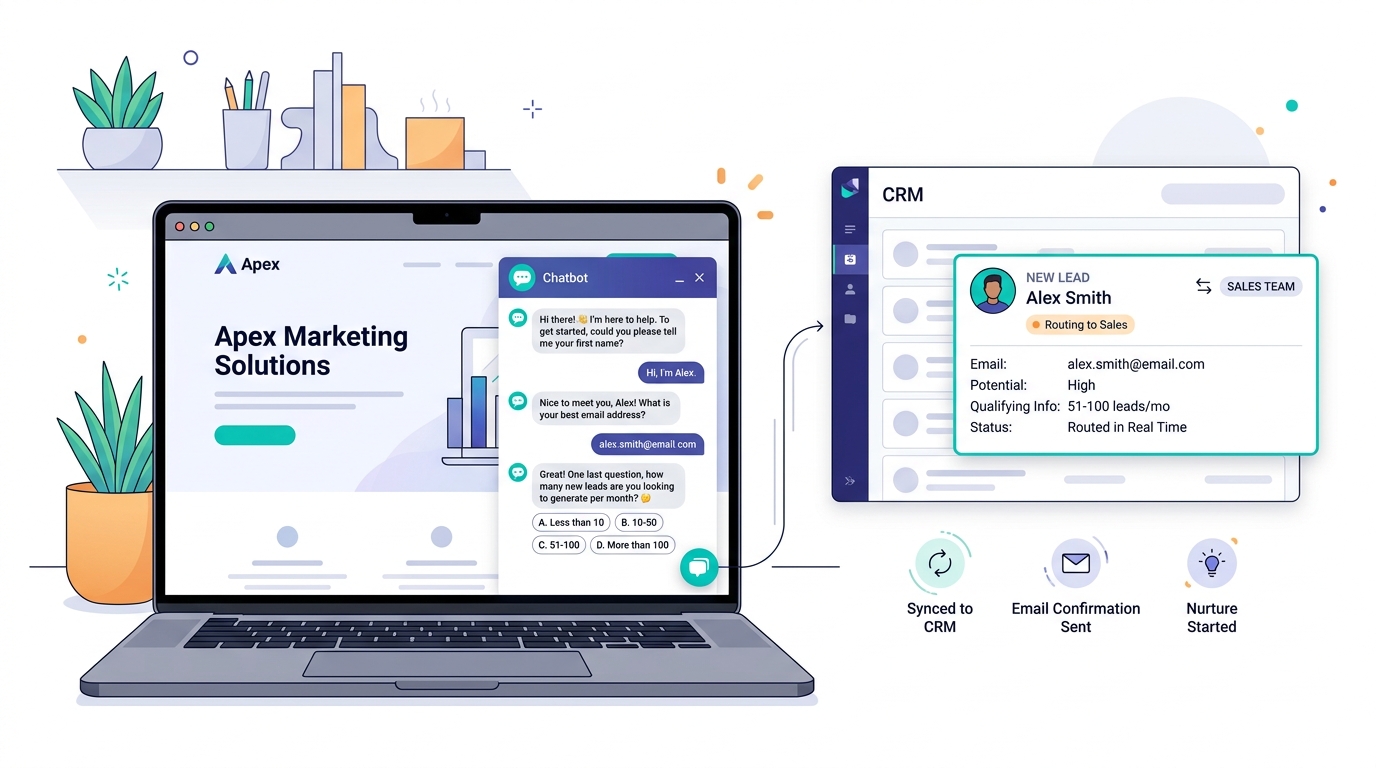
What they are: a floating chat bubble in the corner of your site, powered by an AI agent trained on your content. Visitors can ask questions, get instant answers, and the bot collects name + email + qualifying details before handing off.
Top picks (2026 pricing):
| Tool | Free Tier | Paid (Small Business) | Best For |
|---|---|---|---|
| Tidio + Lyro AI | 50 AI conversations | $29/mo + $39/mo for 200 AI convos | Most small businesses |
| Chatbase | Limited (3 chatbots, 30 messages) | $29–$59/mo | Train on PDFs and docs |
| Intercom Fin | None | Seat fee + $0.99/Fin resolution | Larger SMB / e-commerce |
| Crisp | Free tier (with branding) | $25–$95/mo | Multilingual / Cabo + US |
Tidio is the right default for 90% of the small businesses I work with — flat monthly pricing, predictable costs, and the AI add-on (Lyro) handles real qualification (Tidio Pricing, 2026). Intercom Fin is more powerful but billing is per-resolution, so a single high-traffic month can punch a hole in the budget.
2. Smart Forms with AI Logic
What they are: forms that branch based on previous answers, use AI to draft personalized confirmation emails, or replace a multi-page form with a conversational flow.
Top picks:
- Tally ($0–$29/mo) — clean, conversational, free tier covers most small businesses
- Typeform ($25–$50/mo) — slick UX, good for higher-budget tourism / hospitality
- Formless by Typeform (in beta, conversational AI form) — closest to a chatbot in form clothing
- Tally + Make.com webhook — pair with Make to add AI scoring and routing for $0 extra
Smart forms beat static forms on completion rate because every irrelevant question disappears. A wedding venue inquiry should not show "do you need rooms?" if the user already said "day-of event only." Branching logic can lift form completion rates by 30–50% on its own — and if you want to push past that to a true AI-personalized lead magnet, the $50/month AI lead magnet build guide for service businesses walks through the full Tally + OpenAI + MailerLite + Make.com stack end to end.
3. Click-to-Call AI Voice Agents
What they are: a button on your site that opens a phone call with an AI voice agent. The agent answers product questions, books appointments, and captures lead details. Powered by VAPI, Bland.ai, or 11Labs.
Top picks:
- VAPI (~$0.05–$0.15/min, no monthly fee for low volume) — most flexible, what I deploy for restaurants
- Bland.ai (~$0.09/min) — easier to configure, slightly less customizable
- 11Labs Conversational AI ($5/mo + usage) — best voice quality, premium feel
This category is overkill for most service businesses but a unfair advantage for restaurants, hotels, and clinics where the prospect's first instinct is to call. The alternative — answering the phone yourself or paying a receptionist — costs 10× more. I cover the implementation pattern in detail in n8n for restaurant operations.
4. AI-Powered Instant Email Follow-Up
What they are: webhook-triggered email sequences that fire within seconds of a form submission, with AI drafting the first reply based on the lead's specific question.
Top picks:
- Brevo (free up to 300 emails/day) + OpenAI API for draft generation
- Make.com or n8n as the orchestration layer (free tier covers most small businesses)
- Customer.io ($100/mo) — full-fledged platform, worth it past 100 leads/month
This is the cheapest, highest-ROI add-on. A free Brevo account plus a Make.com scenario that calls OpenAI to draft a personalized first reply can cut your average response time from 6 hours to under 30 seconds. The 5-minute rule does not require a human; it requires a system.
5. AI Lead Scoring + Routing
What they are: webhooks that take every new lead, score it with an AI prompt (high/medium/low intent), and route it to the right channel — your inbox, a sales rep, a CRM, or a Slack alert.
Top picks:
- n8n (self-hosted, free; cloud $20/mo) + OpenAI — the most flexible
- Make.com ($0–$29/mo) — easiest for non-developers
- Zapier ($29.99–$73.50/mo) — most popular but most expensive
Lead scoring is what separates "I get 156 leads a month" from "I get 156 leads a month and only spend time on the 30 worth calling." For tour operators specifically, this is the same mechanism I describe in automated lead follow-up for tour operators.
How to Add an AI Chatbot to Your Existing Site in 90 Minutes
This walkthrough uses Tidio + Lyro AI on a Squarespace, WordPress, or Webflow site. The pattern is identical for Wix, Shopify, and most static sites.
Step 1: Create the chatbot account (10 minutes)
Sign up at tidio.com, choose the Starter plan with the Lyro add-on, and connect your website domain. Tidio gives you a JavaScript snippet to install. If your site uses WordPress, install the Tidio plugin instead — same result, no code touched.
Step 2: Train the bot on your real content (30 minutes)
This is where most small businesses cut corners and get a bad bot. Do not skip:
- Upload your services page, pricing page, FAQ page, and at least 5 representative blog posts. The AI uses these as its knowledge base.
- Write 10–15 sample question/answer pairs specific to your business. "What's your cancellation policy?" "Do you offer bilingual service?" "How much does X cost?" The model gets dramatically better with these seeded.
- Add your hours, address, and service area. A bot that does not know you are in Cabo and the user is in Cabo cannot answer "are you open today?"
Step 3: Configure the lead capture flow (20 minutes)
Set up a default flow that triggers when the AI cannot answer or when the visitor expresses buying intent ("how do I book," "what's the price," "can someone call me"):
- AI asks for name
- AI asks for email
- AI asks 1 qualifying question (use case, timeline, or budget — pick one)
- AI confirms the human will follow up within X hours
- Webhook fires to your CRM or inbox
Keep it to four questions max. Friction kills conversion. If you need more detail, capture it in the human follow-up email.
Step 4: Connect to your CRM and inbox (15 minutes)
Use Tidio's built-in integrations with HubSpot, Salesforce, or Pipedrive. If you do not use a CRM yet, fire a webhook to Make.com or Zapier, which can:
- Send the lead to your Gmail inbox with full context
- Add the lead to a Google Sheet for tracking
- Trigger an instant email reply (the #4 category from above)
- Post to a Slack channel for team visibility
This step is what closes the response-time gap. Without it, the bot collects leads into a UI you may not check daily.
Step 5: Test on mobile, desktop, and incognito (15 minutes)
Open your site in:
- A mobile browser on cellular (not Wi-Fi)
- A desktop browser in incognito mode
- A desktop browser in a different country (use a VPN)
Run through the full flow each time: visitor question → AI answer → buying intent → lead capture. Check that the lead actually arrives in your inbox or CRM. Confirm the bot does not break on a slow mobile connection — relevant if you also follow mobile-first web design principles.
Total time: about 90 minutes for a small business with a clear service offering. The bot starts working the moment you publish, and you can refine the training data as you see real conversations.
What an AI Lead Capture Stack Costs
Real numbers for a typical small business doing 1,000–5,000 monthly visitors:
| Component | Tool | Monthly Cost |
|---|---|---|
| AI chatbot widget | Tidio + Lyro AI | $29 + $39 = $68 |
| Smart form | Tally (free tier) | $0 |
| Webhook orchestration | Make.com (free tier) | $0 |
| Instant email follow-up | Brevo + OpenAI API (~$5 in tokens) | $5 |
| Lead scoring (optional) | n8n self-hosted on $5 VPS | $5 |
| Total | $78/month |
If you skip the optional pieces, $68/month gets you the core stack. If you scale to 10,000+ visitors a month, expect $99–$150/month as you upgrade Tidio's Lyro tier and use more OpenAI tokens.
For context: a part-time virtual assistant who answers website inquiries costs $400–$1,500/month. The AI stack does the first-touch work for under $100. The VA — if you keep one — handles only the qualified conversations the AI cannot close.
Common Mistakes That Tank AI Lead Capture
The patterns I see most often when small businesses install AI lead capture and get worse results than they expected:
Bot trained on too little content. A chatbot that answers "I'm not sure, let me connect you to a human" 60% of the time is worse than no bot at all. Spend the 30 minutes uploading real content.
Lead capture too aggressive. A bot that asks for an email in the first message before answering anything reads as a spam trap. Answer the question first; capture the lead second.
No human escalation path. Every flow needs an "I want to talk to a human" exit. Otherwise the bot becomes a wall.
No webhook to your inbox. I have seen Tidio installs that collected 80 leads in a month — sitting in a Tidio inbox the owner never opened. Connect the webhook on day one.
Ignoring mobile. A perfectly tuned chatbot that opens a 600-pixel-wide popup on a 360-pixel mobile screen is a conversion killer. Test mobile first; that is where most of your traffic lives.
No bilingual support in bilingual markets. In Cabo specifically, a lead-capture flow that only speaks English misses 30–50% of the local market. Tidio and Crisp both handle multilingual conversations natively. I cover the bilingual side in detail in bilingual AI consulting for Mexican hospitality.
The full pattern of avoidable mistakes is in common AI automation mistakes small businesses make — the lead capture failures are the same shape as the broader automation failures.
Frequently Asked Questions
Do I need to rebuild my website to add AI lead capture? No. Every tool in this guide is a JavaScript widget, embedded form, or webhook integration that drops onto your existing site. WordPress, Squarespace, Wix, Webflow, and custom sites all support these. Setup is 90 minutes for a chatbot, 30 minutes for a smart form.
What's the difference between an AI chatbot and a regular chatbot? A regular chatbot follows a scripted decision tree — push button A, get answer B. An AI chatbot uses a language model trained on your content, so it can answer questions you did not anticipate. The difference is dramatic: AI chatbots resolve 65–68% of inquiries autonomously versus 25–35% for scripted bots.
How much does AI lead capture cost for a small business? A working stack costs $0–$99/month. The free version uses Tally + Make.com + Brevo and a self-hosted bot. The $68–$99 tier uses Tidio + Lyro AI + paid Brevo. Most small businesses break even in the first month based on the lift in lead volume alone.
Will an AI chatbot annoy my visitors? Only if you configure it badly. Set the chat bubble to appear after 15–30 seconds, not on page load. Use a short, friendly greeting. Never block the page with a popup. Let visitors close the chat without commitment. Done right, the bot is the most helpful element on your site.
Can I run AI lead capture in two languages? Yes. Tidio, Crisp, and most modern chatbot platforms detect the visitor's browser language and respond accordingly. For Cabo-based businesses with US and Mexican customers, this is non-negotiable — running an English-only bot in a 50/50 market cuts your effective lead pool in half.
How long until I see results? You get the first lead through the AI flow within hours of installing it. Conversion rate lift is measurable in 2–4 weeks once you have enough sessions to compare baseline to AI-assisted. Most businesses see a 2–3× lift in qualified leads within 60 days.
What happens to leads when I'm asleep or on vacation? The AI handles the first touch, captures contact details, and sends the lead to your CRM or inbox. A simple Make.com scenario can also fire an instant personalized email reply within 30 seconds — so the lead gets a response even if you do not look at your inbox until morning. This is the entire point of automating lead capture: the response time stays consistent regardless of when you are at your desk.
Do AI chatbots work for highly specialized businesses? Yes, but the training matters more. A medical clinic, law firm, or specialty consultant needs to upload extensive content — services, FAQs, intake processes, policies — for the bot to respond accurately. Plan on 2–3 hours of upfront training versus 30 minutes for a simpler service business. The payoff scales with the specialization.
The Bottom Line
The "I just have a contact form" era of small business websites is over. Visitors expect instant answers, your competitors are starting to deliver them, and the tooling has dropped from enterprise-only to $29–99 per month. The work is no longer building the AI — it is configuring it well, training it on your real content, and wiring it to your inbox so leads do not die in a chat platform.
Start with one AI chatbot widget, one webhook to your inbox, and one instant-email-follow-up scenario. That stack costs $68 a month, takes 90 minutes to install, and typically lifts qualified lead volume by 2–3× in the first 60 days. Add smart forms, voice agents, and lead scoring only after the core is working.
If you want help mapping the right AI lead capture stack to your specific website, traffic level, and budget, book a free 30-minute discovery call and I'll walk through what I'd install and in what order. No rebuild required.